
Mining Remediation Authority Map Viewer – Help
Desktop version help and additional information
Mining Remediation Authority Map Viewer here.
OS Terms & Conditions, Metadata and WMS links available in Additional Information.
Themes
The Mining Remediation Authority Map Viewer is divided into four individual themes: ‘Planning’, ‘Coal Mining’, ‘Mine Water Heat’ and ‘Metal Mines – England’.
These themes can be selected by using the buttons available in the header bar, as seen below.

Navigating the map
Choose where you would like to investigate.
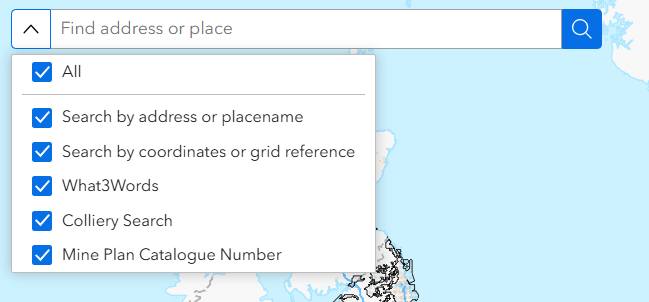
To search by location: enter a placename, address, postcode, coordinates (Easting and Northing), grid reference or a What3Words location. You can toggle the search functions on and off, or you can leave them all active. When using the Mine Plan Catalogue Number or Colliery searches, we would recommend turning the other options off that you are not using.
Additional search options include by colliery and mine plan catalogue number, available in the Planning, Coal Mining and Mine Water Heat themes.
Map Navigation is available by three methods:
1. On-screen (top left of the map view):
. To zoom in or out, use the plus and minus buttons.
. To return to the original map extent select the home button.
. To zoom to your current location use the ‘Find my Location’ icon. This functionality needs enabling in your browser’s location settings.
. To reset orientation use the arrow button.
2. Mouse
. Move around the map by holding the left mouse button and dragging the cursor in the direction you wish to travel.
. Zoom in and out by using the scroll wheel.
. Hold the shift key and drag a rectangle over an area of the map to zoom in to that extent.
. Rotate the image by holding the right click and moving the cursor.
3. Keyboard:
. To move incrementally around the map use the cursor keys.
. To zoom in and out use the ‘+’ and ‘-‘ keys.
. To rotate the map view use the ‘A’ and ‘D’ keys.
British National Grid coordinates (BNG) for the current cursor position are displayed in the bottom left of the screen. The coordinate display will change as you move your cursor across the map. By toggling the cross symbol on the coordinate toolbar, you will be able to click on locations of the map to get the coordinates in BNG. They can then be copied to your clipboard using the copy button on the toolbar.

Displaying data
Each of the four themes has different data available to be viewed. This is listed in the ‘Map Layers’ window. If you close the window, it can be reopened using the ‘Map Layers’ button in the top-right of the screen on the header bar.
The ‘Legend’ button is also available here, and displays a key for currently active layers. The ‘Help’ button brings you back to this page.

When the ‘Map Layers’ window is open, it should look much like this, depending on the theme.
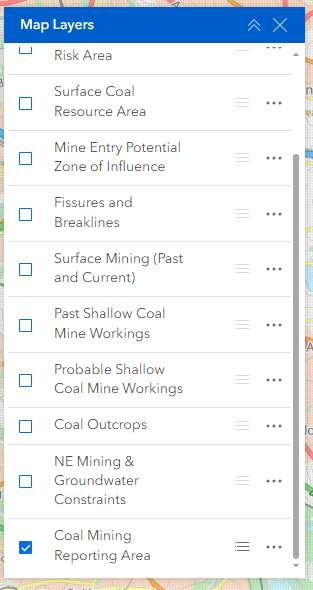
Layers can be toggled on and off using the checkboxes or by just clicking on the layer name. Scroll up and down to view all layers in the theme. If the Layer name is displayed in grey, it is not available to view at that particular scale, and you must zoom in/out to see it.
By default, the Coal Mining Reporting Area is illustrated. This gives you the extent of the coalfield area within which coal mining reports are required in the conveyancing process and are thus a good representation of the extent and location of mining-related data held by the Mining Remediation Authority. Data is typically not available outside of these areas.
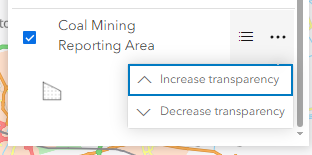
Other options available in the ‘Map Layers’ window include a toggle button to display the icon/symbology for each layer below the layer name, as well as an option to increase/decrease layer transparency using the ellipsis button.
Getting feature details
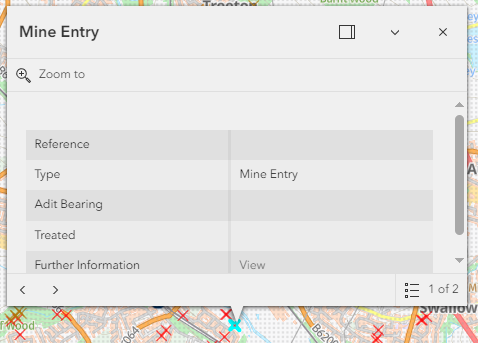
Left click on a feature on the map to return its attribute details. Links to further information, external links, data sources and the ability to zoom to the selected feature are also provided for many of the datasets. If more than one feature is present at the selected location, links to step through all available features are presented (see image below – ‘1 of 2’ list to the bottom-right of the pop-up).
Mine Plan
The coal mining archive has now been released for viewing through this site. The comprises of over 120,500 plans. These provide essential information about the history and legacy of coal mining across Great Britain. Although their style and level of detail vary widely—from ornate Victorian manuscripts to modern sheets—they all share the same purpose: to record what was mined, where, and when, to help manage safety, ownership, and future land use.
A detailed guide to understanding coal mine plans, how to make sense of them in modern world terms using the viewer, and a glossary of common terminology is available through Understanding coal mine plans.
To view the extents of the workings on these plans, ensure that the ‘Mine Plans’ Layer is enabled (toggled on). Zoom in until the extent become visible at which point clicking in the map bring up a summary information box through which the attributes of intersecting plans at the Catalogue Number level can be viewed. By selecting the ‘view’ option all related plans within that Catalogue Number are returned for individual viewing via the associated ‘scan’ hyperlink.
Copies of plans can be obtained by completing the following GOV.UK form found at purchase plans.
To report an issue or provide an update to a Mining Remediation Authority mine plan please use the GOV.UK form found at plan feedback.
Please note that the Mining Remediation Authority classify all plans under the broad category of ‘coal and associated minerals’, so do not identify specific minerals, in contrast to the BGS.
Additional Information
Free of charge coal mining information/WMS provision
Ordnance Survey Data
Contains OS data © Crown Copyright and database right 2026 OS AC0000820577. Use of this data is subject to the following terms and conditions:
. You are granted a non-exclusive, royalty free revocable licence solely to view the licensed data for non-commercial purposes for the period during which the Mining Remediation Authority makes it available;
. You are not permitted to copy, sub-license, distribute, sell or otherwise make available the licensed data to third parties in any form; and
. Third party rights to enforce the terms of this licence shall be reserved to OS.
Abandoned Mines Catalogue
Scanned images terms and conditions: Mining Remediation Authority – GOV.UK
Some of the records held in the Mine Plan Catalogue are private ownership plans not held by the Mining Remediation Authority and of largely unknown origin.
Most, but probably not all, were added to the catalogue between 1928 and 1931. As a consequence of two ‘inrush’ accidents in 1923 and 1925, the Secretary for Mines made a widespread appeal in July 1925 for plans of old workings not covered by the statutory deposition requirements. Either the actual plan, or details of the plan, where the custodian did not wish to relinquish their plan(s) (subsequently becoming ‘PO’ (private ownership) plans), were deposited.
Metadata
Planning Theme
. https://www.gov.uk/government/publications/coal-mining-data-mine-entries
. https://www.gov.uk/government/publications/coal-mining-data-abandoned-mines-catalogue
. https://www.gov.uk/government/publications/coal-mining-data-development-high-risk-areas
. https://www.gov.uk/government/publications/coal-mining-data-surface-resource-areas
. https://www.gov.uk/government/publications/coal-mining-data-potential-zone-of-influence
. https://www.gov.uk/government/publications/coal-mining-data-fissures-and-breaklines
. https://www.gov.uk/government/publications/coal-mining-data-past-shallow-coal-mine-workings
. https://www.gov.uk/government/publications/coal-mining-data-probable-shallow-coal-mine-workings
. https://www.gov.uk/government/publications/coal-mining-data-outcrops
. https://www.gov.uk/guidance/mining-and-groundwater-constraints-for-development
. https://www.gov.uk/government/publications/coal-mining-data-known-areas-of-activity
Coal Mining Theme
. https://www.gov.uk/government/collections/coal-mining-data
Mine Water Heat Theme
. https://www.lyellcollection.org/doi/10.1144/qjegh2020-109
. https://www.gov.uk/government/publications/coal-mining-data-known-areas-of-activity
. https://www.ordnancesurvey.co.uk/products/boundary-line
. https://www.bgs.ac.uk/datasets/bgs-geology-625k-digmapgb/
Metal Mines – England – Theme
. Inventory of Closed Mining Waste Facilities – data.gov.uk
. Water Framework Directive (WFD) Surface Water Management Catchments Cycle 3
. Water Framework Directive (WFD) Surface Water Operational Catchments Cycle 3
Contact
If you need further support with this application please contact customerservice@miningremediation.gov.uk